

How does Hosting Server Location Impact Website SEO
[Updated: March 4, 2026] A server in Virginia adds 200ms of latency for a visitor in Berlin. That delay hits every page load, every API call, every admin click.
This guide covers when server location matters for SEO, when it does not, and the right setup for your audience.
Quick Answer
Server location = the physical data center where your hosting server sits. A server in Frankfurt delivers data to German users faster than one in Virginia. This speed difference affects Google rankings indirectly through Core Web Vitals.
Matters most for: E-commerce stores targeting specific regions, Magento sites with heavy backend processing, businesses competing in tight SERPs where milliseconds decide rankings
Matters less for: Sites with CDN or edge computing setups, static websites, global SaaS platforms with edge rendering
What is Server Location?
Server location refers to the geographic position of the data center hosting your website. When a user visits your site, their browser sends a request to this server. Data travels through physical cables and network hops. The farther the distance, the longer the round trip.
This distance creates latency. Latency is the delay before data transfer begins. It is measured in milliseconds (ms) and influences how fast your pages load.
For a Magento store running on AWS US-East (Virginia), a customer in Berlin experiences about 100-150ms of network latency before the server even starts processing. Move that server to AWS EU-Central (Frankfurt), and latency drops to 5-15ms.
Does Server Location Affect SEO?
Server location affects SEO, but it is an indirect factor. It does not appear in Google's ranking algorithm as a standalone signal. Instead, it influences other factors that Google does measure. Here are the three main mechanisms.
1. Page Speed and Core Web Vitals
Google uses Core Web Vitals as part of its page experience evaluation. Since 2024, these are treated more as a tie-breaker in competitive SERPs than as a hard ranking cutoff. But in niches where the top 10 results are close in quality, 100-200ms of extra latency can tip the balance.
The three Core Web Vitals in 2026 and how server location affects them:
| Metric | What It Measures | Good (Google 2026) | Competitive Target | Server Location Impact |
|---|---|---|---|---|
| LCP | Largest content load time | ≤ 2.5 s | < 2.0 s | High: adds 100-200ms from distant servers |
| INP | Interaction responsiveness | ≤ 200 ms | < 150-180 ms | Moderate: delays JS execution via TTFB |
| CLS | Visual stability | ≤ 0.1 | < 0.05 | Low: layout shifts are client-side |
LCP suffers most from server distance. A server 10,000 km away adds 100-200ms before content even starts loading. TTFB (under 200ms = excellent, under 400ms = good) directly compounds this delay for dynamic sites like Magento.
INP replaced FID in 2024 as Google's responsiveness metric. Slow server responses delay JavaScript execution and event handling, pushing INP above the 200ms threshold.
A 1-second delay in page load time can reduce conversions by 4-10% depending on the industry (diverse studies 2025/26). For e-commerce, that translates to measurable revenue loss.
2. Geographic Relevance Signals
Server IP location can serve as a minor supporting signal for geographic targeting. But in 2026, it plays a small role compared to the dominant geo-signals:
- hreflang tags and content language
- ccTLD (.de, .co.uk, .fr)
- Google Search Console geo-targeting settings
- Local backlinks and citations
- Google Business Profile
A server in Germany serving a German audience adds one small piece to the puzzle, but hreflang and ccTLD carry far more weight. For international businesses, getting these other signals right matters more than server placement.
3. Crawl Efficiency
Googlebot crawls from data centers worldwide. A server that responds fast to crawl requests gets crawled more often and with greater depth. Slow TTFB can reduce the number of pages Google processes per crawl session.
This is most relevant for large Magento stores with 10,000+ product pages. For smaller catalogs (under 5,000 pages), crawl budget is rarely a bottleneck. Google has also shifted its terminology toward "crawl demand" and render capability rather than raw crawl budget.
For Magento stores with large catalogs, fast server response helps Google index new products and price changes faster.
How Server Location Impacts Latency
Latency increases with physical distance. This diagram illustrates how latency grows from a US-East origin server to cities worldwide:
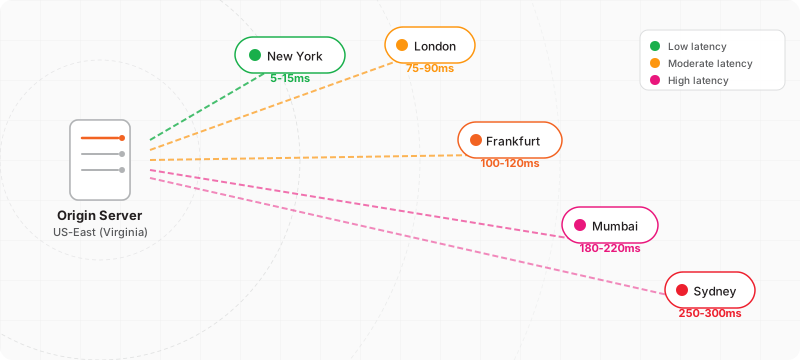
The exact numbers for a server in AWS US-East (Virginia):
| User Location | Latency (ms) | TTFB Impact |
|---|---|---|
| New York | 5-15 | Minimal |
| London | 75-90 | Noticeable |
| Frankfurt | 100-120 | Moderate |
| Mumbai | 180-220 | High |
| Sydney | 250-300 | Severe |
For a Magento store that needs 200-400ms of server-side processing (database queries, block rendering, full page cache misses), these latency numbers compound. A user in Sydney would wait 450-700ms for the first byte alone, before the browser starts rendering.
Compare that to a server in AWS Sydney: the same user gets 5-15ms latency, and TTFB drops to 200-415ms total.
CDN and Edge Computing: Solving the Distance Problem
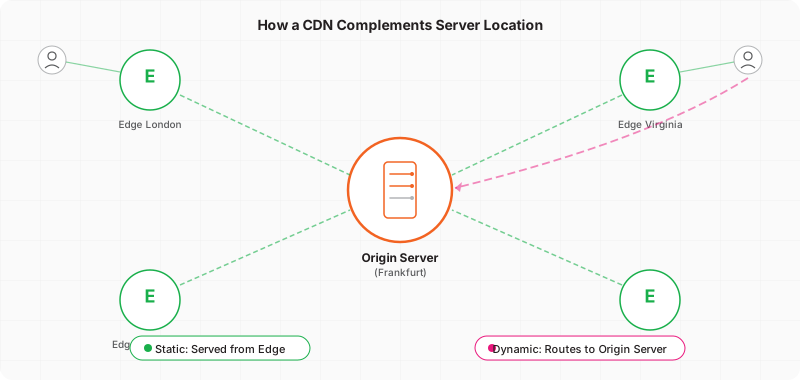
A Content Delivery Network (CDN) caches static assets (images, CSS, JavaScript) at edge locations worldwide. This eliminates latency for cached content. But a traditional CDN does not solve everything.
What a CDN fixes:
- Static asset delivery (images, CSS, JS, fonts)
- Cacheable HTML pages (product pages with full page cache)
- Geographic distribution of cached content
What a traditional CDN does NOT fix:
- Dynamic content generation (cart updates, checkout, admin panel)
- TTFB for uncached pages (first visit, logged-in users)
- API calls to the origin server
- Database query latency
Edge computing changes this equation. In 2026, platforms like Cloudflare Workers, AWS Lambda@Edge, and Vercel Edge Functions can execute logic at edge locations. This reduces origin server hits even for many dynamic requests. For Magento, edge-side rendering of catalog pages and personalization layers is becoming more common, reducing the performance gap between origin and edge.
For a Magento store using a CDN, cached product pages load fast worldwide. Checkout and admin operations still depend on origin server location, but edge computing narrows this gap further each year.
The optimal setup: server in your primary market + CDN with edge capabilities for global reach.
Choosing the Right Server Location
Step 1: Identify Your Primary Market
Check your Google Analytics data. Where are most of your customers? If 70% of traffic comes from Germany, host in Frankfurt. If 60% comes from the US East Coast, host in Virginia.
Step 2: Match Server to Customer Location
Major cloud providers offer data centers worldwide:
| Region | AWS Region | Ideal For |
|---|---|---|
| US East | us-east-1 (Virginia) | North American stores |
| EU Central | eu-central-1 (Frankfurt) | European stores |
| EU West | eu-west-1 (Ireland) | UK and Ireland stores |
| Asia Pacific | ap-southeast-1 (Singapore) | Southeast Asian stores |
| Asia Pacific | ap-northeast-1 (Tokyo) | Japanese and Korean stores |
When evaluating a hosting company, check which data center regions they support. A provider limited to one or two locations may force a suboptimal server location for your target audience.
Step 3: Add a CDN for Secondary Markets
If your German store gets 20% traffic from the US, add CloudFront or Cloudflare. The CDN handles static content for US visitors while your Frankfurt server handles dynamic requests fast for the 70% in Europe.
Step 4: Monitor and Optimize
Use Google Search Console and PageSpeed Insights to track Core Web Vitals by region. If LCP exceeds 2.5 seconds for a specific region, consider adding edge caching or upgrading your CDN configuration.
Server Location for Magento Stores
Magento is more sensitive to server location than simpler platforms. Here is why:
Heavy backend processing: Magento's architecture involves complex database queries, EAV structure processing, and dynamic block rendering. Server-side processing takes 200-800ms even on optimized setups. Adding 150ms of network latency on top makes a noticeable difference.
Full Page Cache dependency: When Varnish or built-in FPC serves cached pages, server location matters less. But cache misses (new products, first visits to uncached pages, price changes) fall back to full Magento rendering, where origin server speed is critical.
Admin panel performance: Store administrators need a responsive admin panel. If your team is in Germany and the server is in the US, every click in the Magento admin adds 200ms of lag. Over a full workday, this adds up.
Recommended setup for Magento:
- Host on managed Magento hosting in your primary market's region
- Enable Varnish Full Page Cache for product and category pages
- Add CloudFront or Cloudflare for static assets and edge caching
- Monitor TTFB with real-user monitoring tools
How Important Is Server Location for SEO?
Server location matters, but it is one of hundreds of ranking signals and not among the top factors. Here is how it compares:
| Factor | Impact on Rankings | When It Matters Most |
|---|---|---|
| Content Quality | Very High | Always |
| Backlinks | Very High | Always |
| Core Web Vitals | Moderate (tie-breaker) | Competitive SERPs |
| Server Location | Low to Moderate (indirect) | Audience far from server |
| Mobile Optimization | High | Mobile traffic |
| Schema Markup | Low to Moderate | Rich results |
Server location becomes relevant when:
- Your server is on a different continent than your audience
- You compete in tight SERPs where small speed advantages matter
- Your site runs on a resource-heavy platform like Magento without FPC
Server location matters less when:
- You use a CDN with edge caching
- Your audience is in the same region as your server
- Your site is static or has minimal dynamic content
FAQ
Does server location affect SEO rankings?
Indirectly, yes. Server location affects page load speed and TTFB, which influence Core Web Vitals. Google uses CWV as part of its page experience evaluation, but they function more as a tie-breaker in competitive SERPs than as a primary ranking factor. The biggest impact is on user experience and conversion rates.
Does hosting location affect page speed?
Hosting location has a direct effect on page speed. Every 1,000 km of distance adds about 5-10ms of latency. For dynamic sites like Magento stores, this latency applies to every uncached page load, API call, and admin panel interaction.
Can a CDN replace a good server location?
A traditional CDN reduces the impact of server location for cached, static content. Modern edge computing platforms go further by processing dynamic logic at edge locations. But checkout flows and database operations still route to the origin server. The best approach combines a well-located origin server with CDN and edge capabilities.
What is the best server location for an e-commerce store?
The best server location is in the same geographic region as your primary customers. Check Google Analytics for your top traffic sources. If most customers are in Europe, choose a European data center like Frankfurt or Ireland. If in North America, choose US-East (Virginia).
Does Google use server IP to determine location?
Google uses server IP as a minor supporting signal for geographic targeting. The dominant signals are hreflang tags, ccTLD, Search Console geo-targeting settings, local backlinks, and Google Business Profile. Server IP alone has minimal influence on rankings.
How does server location affect Magento stores?
Magento stores are more sensitive to server location than lighter platforms due to complex backend processing. Even with Varnish cache enabled, cache misses, admin operations, and API calls depend on origin server speed. A well-optimized Magento server in the right region delivers better performance.
Should I move my server if my traffic is international?
For international traffic, the optimal strategy is hosting in your largest market and adding a CDN with edge capabilities for secondary markets. Moving to a central location (Frankfurt for Europe, Virginia for North America) covers the widest audience with acceptable latency.
What is TTFB and why does it matter for SEO?
TTFB (Time to First Byte) measures how long the browser waits for the first byte of data from the server. Google rates TTFB under 200ms as excellent and under 400ms as good. Poor TTFB degrades Core Web Vitals scores and user experience. Server location is one of the main factors affecting TTFB.
Does cloud hosting improve server location issues?
Cloud hosting providers like AWS offer data centers in 30+ regions worldwide. This gives you the flexibility to choose a server close to your customers. Cloud hosting for Magento also provides auto-scaling and redundancy that single-location hosting cannot match.
How do I check my current server location?
Use tools like ping, traceroute, or online services like KeyCDN Tools to check your server's IP location. Then compare it to your audience location in Google Analytics. If there is a large gap, consider migrating to a closer data center or adding CDN edge nodes for that region.
Does the location of your hosting company affect SEO?
Your hosting company's data center location affects SEO through page speed. A hosting provider with servers close to your target audience delivers lower latency, faster TTFB, and better Core Web Vitals scores. When choosing a hosting company, check which data center regions they offer and select the one closest to your primary market.
Does server location matter for website speed?
Server location has a direct effect on website speed. Every 1,000 km of distance between server and user adds 5-10ms of network latency. For dynamic sites that process requests server-side (database queries, session handling, cart calculations), this latency compounds on every uncached page load, API call, and admin interaction. A server in your target region delivers measurably faster response times.
Conclusion
Server location influences website SEO indirectly through page load speed, TTFB, and Core Web Vitals. It is not a primary ranking factor like content quality or backlinks, but in competitive niches where top results are close in quality, the speed advantage from a well-placed server can make a difference. For Magento stores with complex backend processing, the impact is amplified.
The fix is straightforward: host your server in the same region as your primary customers, add a CDN with edge computing for global reach. For managed Magento hosting on AWS with data centers in 13+ global regions, you can optimize both server location and performance from day one.
