

Magento CMS: Content Management for Ecommerce Stores
[Updated: April 02, 2026]
Magento handles ecommerce transactions. But it also manages every piece of content on your store: landing pages, banners, product descriptions, and blog posts.
This guide breaks down what Magento CMS offers in 2026, how Page Builder works, what changed with the HugeRTE editor in 2.4.8, and where Adobe Commerce adds features that Open Source does not.
Key Takeaways
- Magento is an ecommerce platform with built-in CMS capabilities, not a standalone content management system
- Page Builder (free since Magento Open Source 2.4.3) provides drag-and-drop editing for pages, blocks, products, and categories
- Adobe Commerce 2.4.8 replaced TinyMCE with the open-source HugeRTE editor for all WYSIWYG fields
- Content Staging and CMS Page Hierarchy are Adobe Commerce exclusive features, not available in Open Source
- CMS blocks and widgets let you reuse content across pages without duplicating code
- Magento supports multi-store, multi-language, and multi-currency content from a single admin panel
What is Magento CMS?
Magento CMS = The content management layer built into Adobe Commerce and Magento Open Source. It handles pages, blocks, widgets, media, and layouts for ecommerce stores. Not a standalone CMS like WordPress, but a purpose-built content system for online retail.
Perfect for: Ecommerce businesses that need product catalogs AND content pages in one platform
Not ideal for: Pure content sites without ecommerce (blogs, news sites, portfolios)
Magento is not a traditional CMS. It is an ecommerce platform that includes content management as one of its core modules. The distinction matters: WordPress started as a CMS and added ecommerce through plugins. Magento started as an ecommerce engine and built content tools around it.
This means Magento's CMS features are designed for store pages, product content, promotional banners, and category descriptions. Every content element ties back to the catalog, the checkout, and the customer experience.
Adobe Commerce and Magento Open Source share the same CMS foundation. Adobe Commerce adds Content Staging, Dynamic Blocks, and CMS Page Hierarchy on top.
Core CMS Components
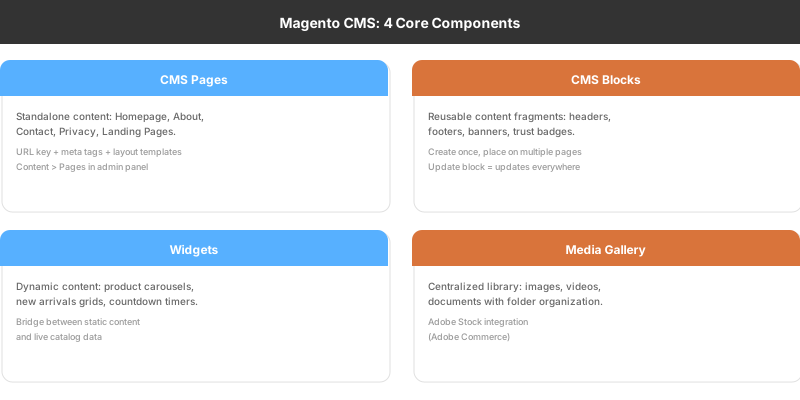
Magento's content management system consists of four building blocks that work together.
CMS Pages
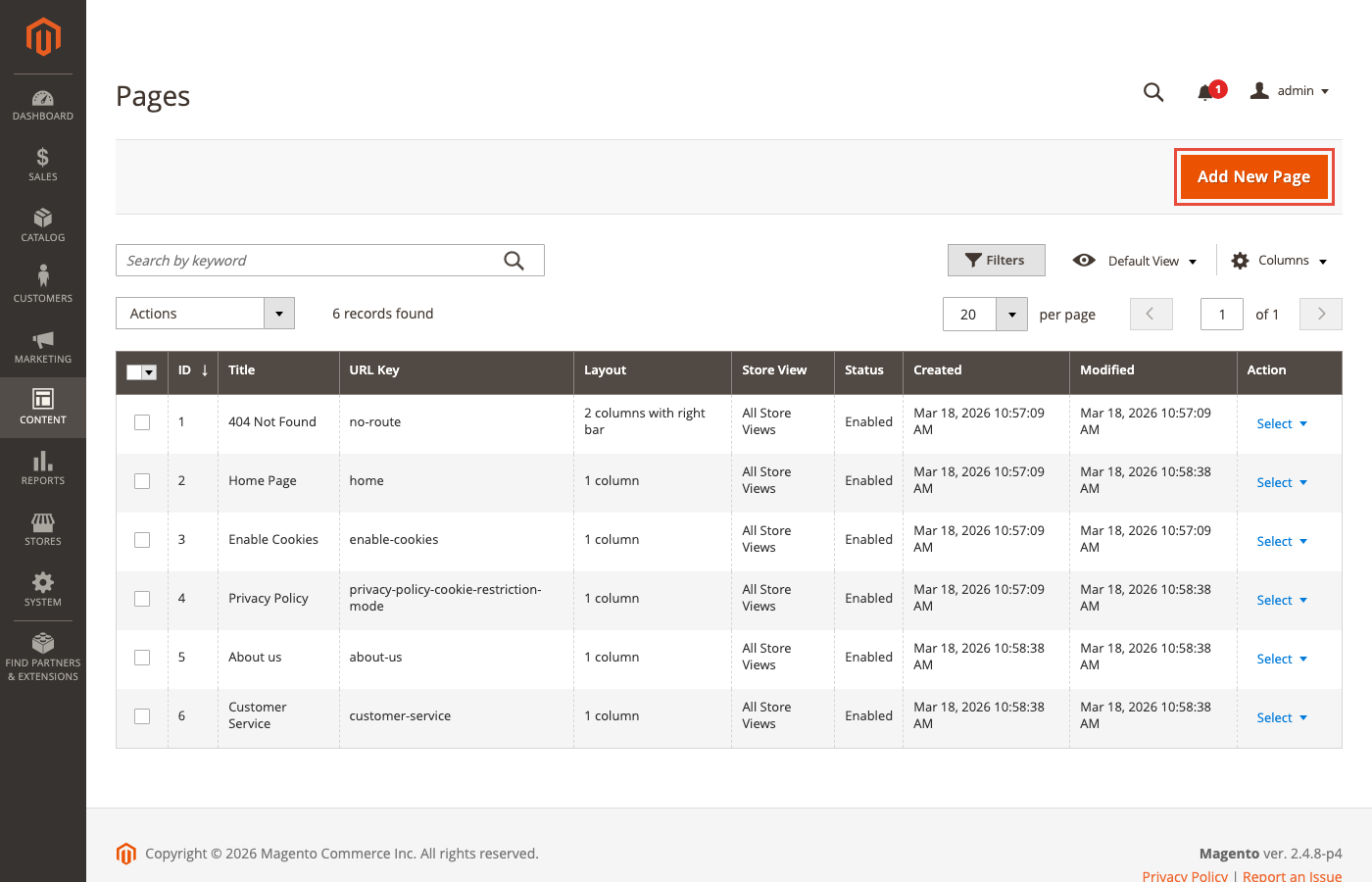
CMS pages are standalone content pages: your homepage, About Us, Contact, Privacy Policy, and any custom landing pages. Each page has a URL key, meta tags, and a content body that you edit through Page Builder or the WYSIWYG editor.
You manage pages under Content > Pages in the admin panel. Every page supports layout templates (1-column, 2-column left, 2-column right, 3-column) and custom design settings.
CMS Blocks
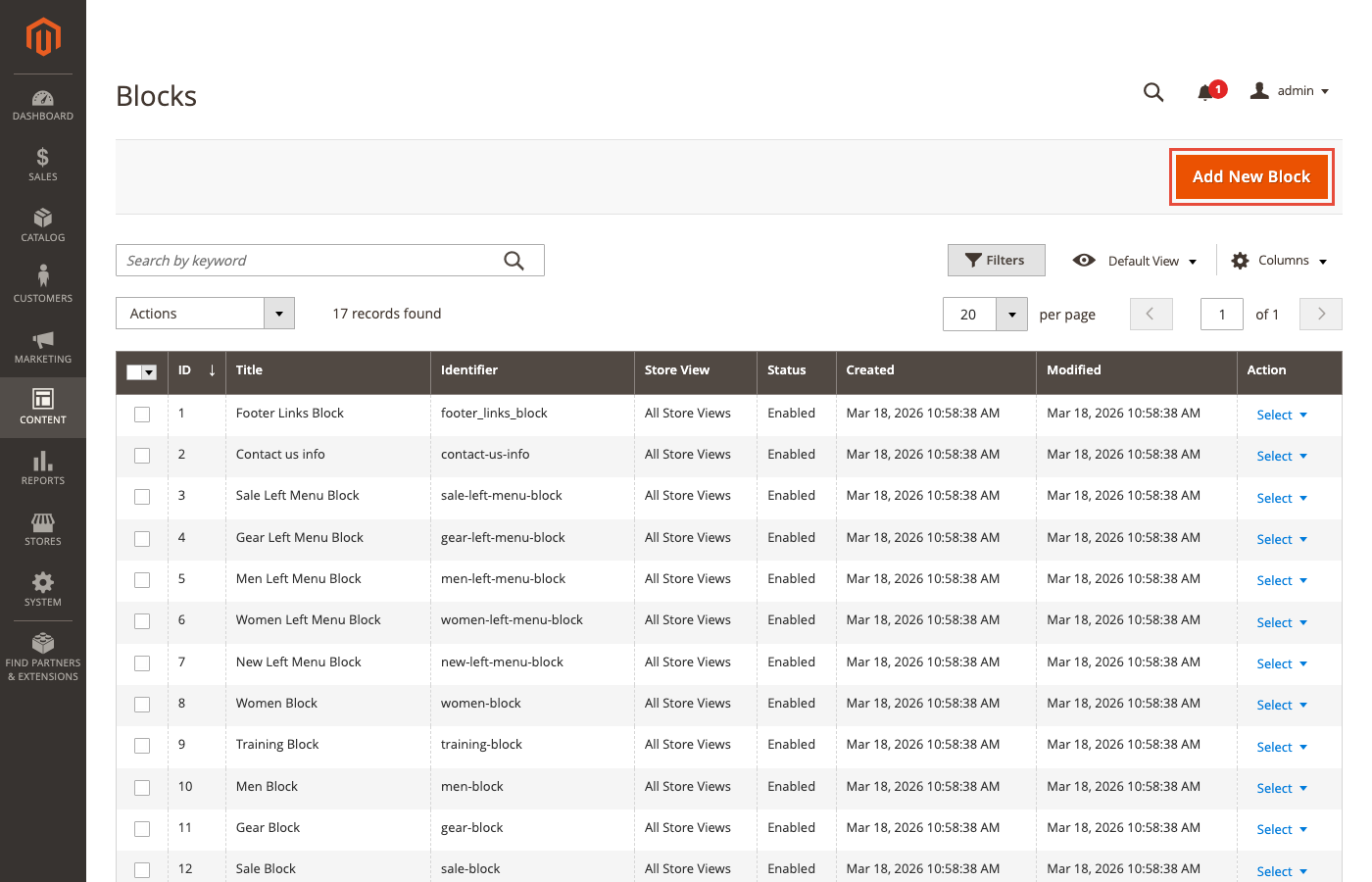
Blocks are reusable content fragments. Create a block once, place it on multiple pages. Headers, footers, promotional banners, trust badges, and sidebar content all work as blocks.
Blocks support HTML, widgets, and dynamic variables. A single "Free Shipping Banner" block can appear on every product page without duplicating content. Update the block once, changes propagate everywhere.
Widgets
Widgets insert dynamic content into pages and blocks. They reference catalog data, CMS blocks, or custom content types. Use cases include:
- Product carousels on the homepage
- "New Arrivals" grids on category pages
- CMS block placement in specific template positions
- Promotional countdown timers
Widgets bridge the gap between static content and live catalog data.
Media Gallery
The centralized media library stores all images, videos, and documents. It supports folder organization, image metadata, and Adobe Stock integration (Adobe Commerce). Upload once, reference across pages, blocks, and product descriptions.
Page Builder: Drag-and-Drop Content Editing
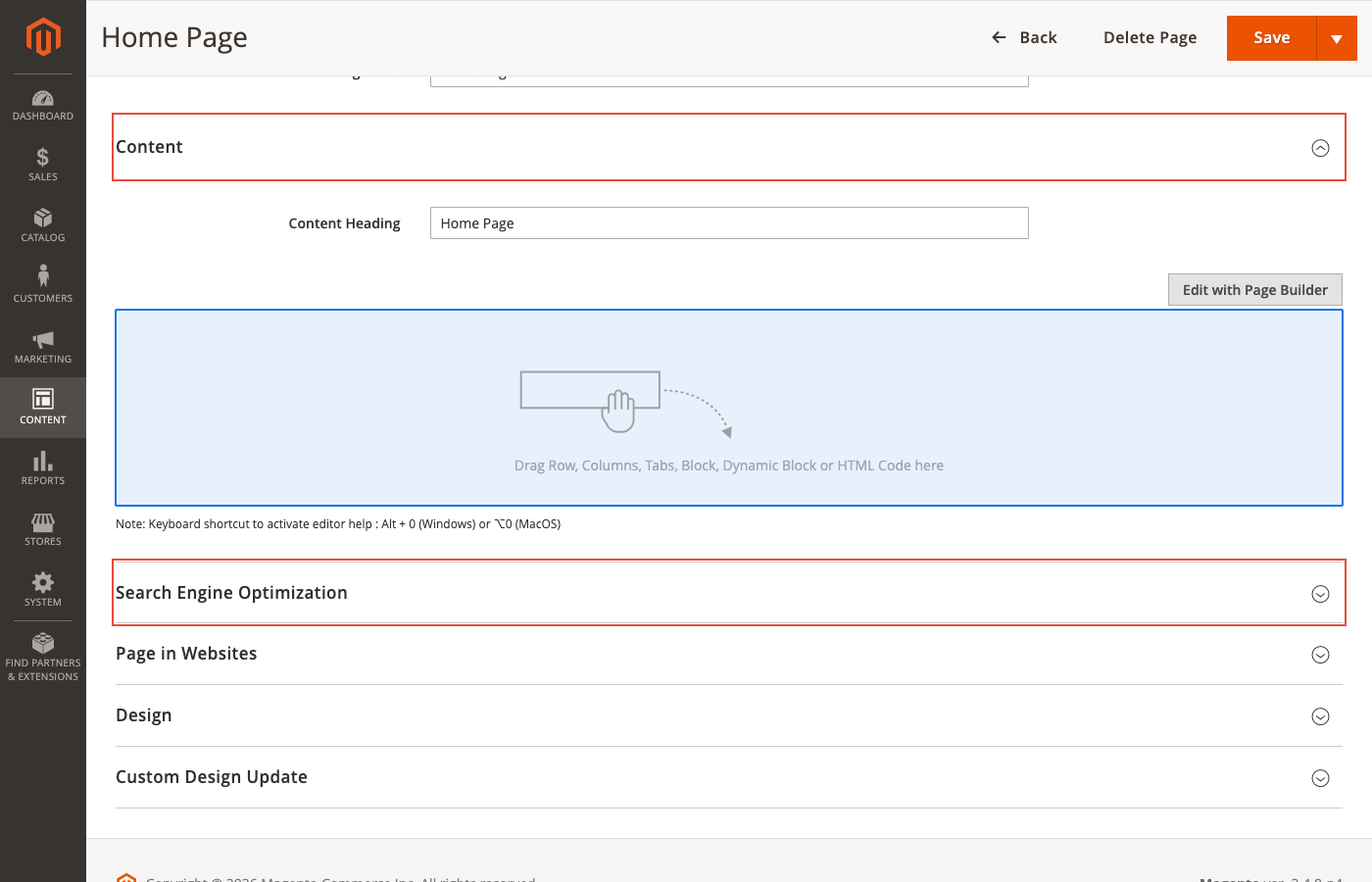
Page Builder is the visual editor that ships free with Magento Open Source since version 2.4.3. It replaces the old WYSIWYG editor as the default content creation tool for pages, blocks, products, and categories.
What Page Builder Offers
| Content Type | Description |
|---|---|
| Rows and Columns | Grid-based layouts with adjustable widths and responsive behavior |
| Tabs | Tabbed content sections for organizing information |
| Text | Rich text editing with formatting, links, and variables |
| Headings | H1-H6 heading elements with alignment options |
| Buttons | Call-to-action buttons with link targets and styling |
| Dividers | Visual separators between content sections |
| HTML Code | Raw HTML blocks for custom embeds and scripts |
| Images | Single images with caption, link, and responsive settings |
| Video | Embedded video from YouTube, Vimeo, or custom sources |
| Banners | Full-width promotional banners with overlay text |
| Sliders | Multi-slide carousels with autoplay and navigation |
| Maps | Google Maps integration with API key |
| Dynamic Blocks | Targeted content based on customer segments (Adobe Commerce) |
Page Builder vs WYSIWYG Editor
| Feature | Page Builder | WYSIWYG (HugeRTE) |
|---|---|---|
| Visual editing | Drag-and-drop | Toolbar-based |
| Layout control | Rows, columns, responsive | Single content area |
| Preview | Live in-admin preview | Separate frontend preview |
| Learning curve | Low (no code needed) | Low (familiar text editor) |
| Custom HTML | Supported via HTML block | Supported via source mode |
| Performance impact | Generates more DOM elements | Leaner HTML output |
Page Builder is the right choice for marketers building landing pages. The WYSIWYG editor works better for developers who want clean HTML control.
HugeRTE: The New WYSIWYG Editor in 2.4.8
Adobe Commerce 2.4.8 replaced TinyMCE with HugeRTE, an open-source editor fork. This is a breaking change for stores that rely on TinyMCE plugins or customizations.
Why the switch: TinyMCE 5 reached end of support. TinyMCE 6 had known security vulnerabilities. TinyMCE 7 introduced licensing incompatible with open-source distribution. HugeRTE solves all three issues.
What changed for merchants: The editing experience looks and feels similar. Most text formatting, image insertion, and link creation works the same way. Custom TinyMCE plugins need migration to HugeRTE's API.
What changed for developers: Any code that references tinymce JavaScript objects, custom toolbar buttons, or TinyMCE-specific configurations requires updates. Adobe provides a migration guide in the developer documentation.
Open Source vs Adobe Commerce: CMS Feature Comparison
Not all CMS features are available in both editions. This matters when choosing your Magento version.
| CMS Feature | Open Source | Adobe Commerce |
|---|---|---|
| CMS Pages and Blocks | Yes | Yes |
| Page Builder | Yes (since 2.4.3) | Yes |
| Widgets | Yes | Yes |
| Media Gallery | Yes | Yes |
| HugeRTE Editor | Yes (2.4.8+) | Yes (2.4.8+) |
| Content Staging | No | Yes |
| Dynamic Blocks | No | Yes |
| CMS Page Hierarchy | No | Yes |
| Scheduled Content Updates | No | Yes |
| A/B Testing (native) | No | Yes |
| Multi-store content | Yes | Yes |
| Multi-language | Yes | Yes |
Content Staging is the biggest differentiator. It lets you schedule content changes (price updates, banner swaps, page redesigns) in advance and preview them before they go live. For stores running frequent promotions, this feature alone can justify the Adobe Commerce license.
Magento CMS vs WordPress vs Shopify
Merchants researching CMS options compare Magento with WordPress (WooCommerce) and Shopify. Each platform takes a different approach to content.
| Factor | Magento CMS | WordPress + WooCommerce | Shopify |
|---|---|---|---|
| Primary purpose | Ecommerce with CMS | CMS with ecommerce plugin | Ecommerce SaaS |
| Page Builder | Native (drag-and-drop) | Gutenberg + plugins | Sections + Liquid |
| Blogging | Basic (needs extension) | Native (best-in-class) | Basic |
| Product content | Native (attributes, variants) | Via WooCommerce plugin | Native |
| Multi-store | Native (store views) | Requires multisite | Shopify Plus only |
| Multi-language | Native (per store view) | Plugins (WPML, Polylang) | Shopify Markets |
| Content staging | Adobe Commerce only | Plugins | Not available |
| Hosting | Self-hosted or managed | Self-hosted or managed | Hosted (SaaS) |
Choose Magento when you need deep product catalog management alongside content pages, multi-store capabilities, and full control over your hosting infrastructure.
Choose WordPress when content (blogging, media, editorial) is your primary focus and ecommerce is secondary.
Choose Shopify when you want managed hosting with zero server management and simpler content needs.
CMS Performance and Hosting
Content-heavy Magento stores put extra load on the server. Every CMS page, block, and widget gets rendered through Magento's layout XML system. Stores with hundreds of CMS blocks or complex Page Builder layouts need adequate server resources.
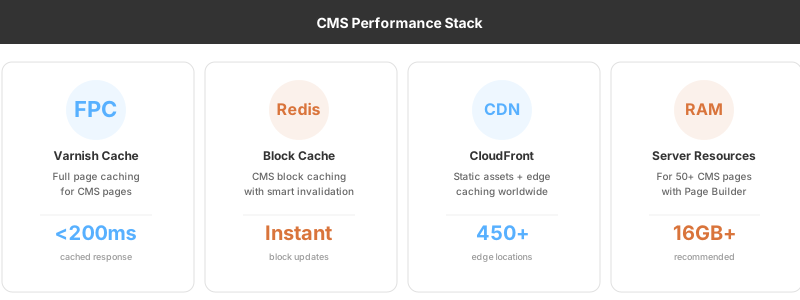
Full Page Cache (FPC) is essential. Varnish or built-in FPC caches rendered CMS pages so they serve in milliseconds instead of regenerating on every request. Without FPC, a Page Builder homepage with sliders, product carousels, and dynamic blocks can take 2-4 seconds to render.
"Managed Magento hosting with Varnish, Redis, and a CDN turns a 3-second CMS page load into a sub-200ms response," says Raphael Thiel, CEO of MGT Commerce.
Redis handles CMS block caching. When you update a block, Redis invalidates only that cache entry while keeping the rest of your cached content intact.
For stores with 50+ CMS pages and extensive use of Page Builder, plan for at least 16GB RAM and SSD storage. Magento system requirements cover the full stack specifications.
SEO Features in Magento CMS
Magento's CMS includes built-in SEO tools that eliminate the need for basic SEO plugins:
Meta tags per page. Every CMS page has dedicated fields for meta title, meta description, and meta keywords. Set them under the "Search Engine Optimization" tab when editing a page.
URL rewrites. Control URL structure for every CMS page. Clean URLs without query parameters. Custom URL keys with proper slug formatting.
XML sitemaps. Generate and submit sitemaps to search engines. Configuration lives under Stores > Configuration > Catalog > XML Sitemap.
Canonical tags. Prevent duplicate content issues across store views and URL variations. Magento sets canonical URLs on CMS pages to signal the preferred version to search engines.
Schema markup. Add structured data to CMS pages through custom HTML blocks or extensions. Adobe Commerce supports enhanced schema for products, reviews, and FAQ pages.
Building Effective CMS Content
Landing Pages
Use Page Builder to create campaign-specific landing pages. A Black Friday landing page needs a hero banner (Banner content type), product grid (Products content type), countdown timer (HTML code block), and a CTA button. Page Builder handles this without a developer.
Product Category Pages
Category descriptions improve SEO and help customers understand your product range. Write 150-300 words per category. Include the primary keyword, mention key brands or product types, and link to relevant blog content or buying guides.
Blog Integration
Magento does not include a native blog module. Most stores add blogging through extensions like Amasty Blog, Magefan Blog, or a headless CMS integration. A blog builds topical authority and drives organic traffic to your store.
Pros and Cons of Magento CMS
FAQ
Is Magento a CMS? Magento is an ecommerce platform with built-in CMS capabilities. It manages pages, blocks, widgets, and media for online stores. It is not a standalone CMS like WordPress or Drupal.
What is the difference between Magento CMS and WordPress? WordPress is a content-first platform with ecommerce added through WooCommerce. Magento is an ecommerce-first platform with content management built in. WordPress excels at blogging and editorial content. Magento excels at product catalogs, multi-store setups, and complex ecommerce workflows.
Is Magento Page Builder free? Yes. Page Builder ships free with Magento Open Source since version 2.4.3 and all Adobe Commerce editions.
What is Content Staging in Magento? Content Staging is an Adobe Commerce exclusive feature that lets you schedule content changes in advance. You can prepare price updates, banner swaps, and page redesigns, preview them, and set them to go live at a specific date and time.
What editor does Magento 2.4.8 use? Magento 2.4.8 replaced TinyMCE with HugeRTE, an open-source WYSIWYG editor. The switch happened because TinyMCE 5 reached end of support and TinyMCE 7 introduced licensing incompatible with open-source distribution.
Can I use Magento CMS for multiple stores? Yes. Magento supports multiple websites, stores, and store views from a single admin panel. Each store view can have its own language, currency, and CMS content.
Does Magento CMS support SEO? Yes. Every CMS page includes fields for meta title, meta description, URL key, and canonical tags. Magento generates XML sitemaps and supports URL rewrites for clean URLs.
How does Magento CMS handle media? Magento includes a centralized Media Gallery for images, videos, and documents. Adobe Commerce adds Adobe Stock integration for licensed stock photography within the admin panel.
What is a CMS block in Magento? A CMS block is a reusable content fragment. You create it once and place it on multiple pages, headers, footers, or sidebars. Updating the block updates every instance across the store.
Is Magento CMS good for large catalogs? Yes. Magento was built for large catalogs with thousands of SKUs. Its CMS features integrate with product attributes, categories, and configurable products. Stores with 100,000+ products run on Magento in production.
Summary
Magento CMS is not WordPress. It is not trying to be. It is the content layer of an ecommerce platform built for stores that need pages, blocks, and product content working together inside one system.
Page Builder makes visual editing accessible without code. HugeRTE replaces TinyMCE with a modern, open-source editor. Adobe Commerce adds Content Staging and Dynamic Blocks for enterprises that need scheduled content workflows.
The performance of your CMS pages depends on your hosting stack. Varnish, Redis, and proper server resources turn complex Page Builder layouts into fast-loading pages. Explore managed Magento hosting to ensure your content performs as well as it looks.
